Element library reference
@ascribed/elements: the custom elements the site output uses, the CSS custom properties that theme them, and styling a project’s own note types and lifecycle states.
For AI agents: the documentation index is at llms.txt, and this page is available as Markdown.
The site output writes Ascribe’s constructs as custom elements, such as <ascribe-note> for a note. @ascribed/elements is the library that draws them: a stylesheet for every element, and a small script for <ascribe-tabs>, the only one with behavior, which also adds a copy button to each code block. This page lists the elements and the CSS custom properties a site sets to theme them, and shows how to style what the library doesn’t know, such as a project’s own note types.
The element contract defines each element exactly: its attributes, its children, and how it renders with and without the script. It’s in the package, as CONTRACT.md.
Using it
A site built with @ascribed/astro has the library already: its <Elements /> component loads the stylesheet and the script. Any other site imports them:
// Registers <ascribe-tabs>, <ascribe-tab>, and <ascribe-group>, and adds
// the copy buttons.
import "@ascribed/elements";
// The styles. Import this alone to style the elements without the script.
import "@ascribed/elements/style.css";
The elements render into the page, with no shadow DOM, so the site’s own styles apply to them too. The stylesheet works with no script at all: without it, every tab of a group shows, one after another, each with its label, nothing is hidden, and code blocks have no copy button.
The elements
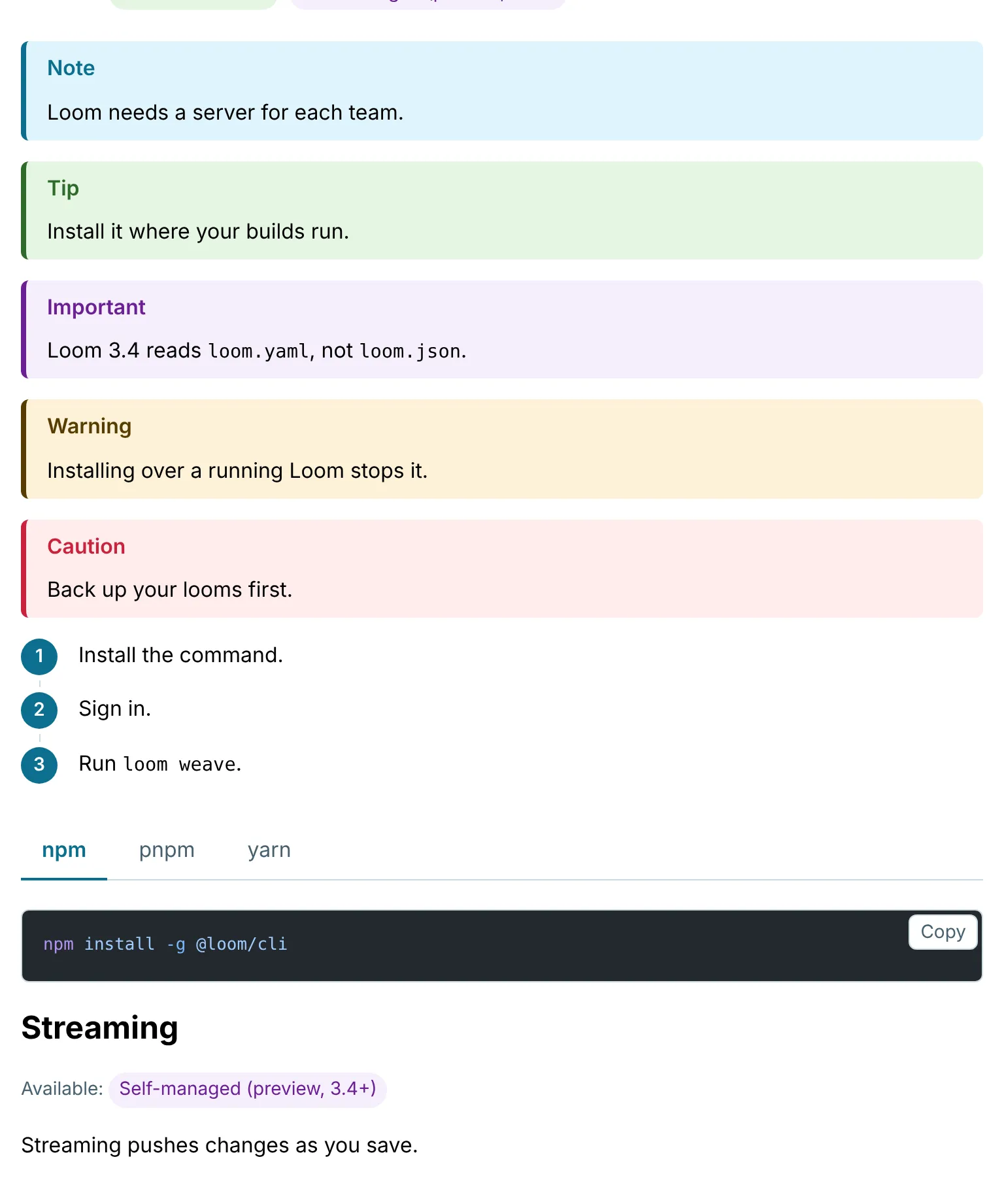
| Element | What the site output writes it for | Contract |
|---|---|---|
<ascribe-note> |
A @note. Its type attribute is the note type, such as tip. |
§1 |
<ascribe-steps> |
A @steps procedure, around its ordered list. |
§2 |
<ascribe-tabs> |
A @variant group that keeps more than one arm. With the script, its tabs switch, and a group with sync remembers the reader’s choice across pages. |
§3 |
<ascribe-tab> |
One arm of <ascribe-tabs>, with its label. |
§3 |
<ascribe-availability> |
An @available badge, holding one target for each thing it’s available on. |
§4 |
<ascribe-availability-target> |
One target of <ascribe-availability>. Its states attribute lists its lifecycle states, and the last one styles the badge. |
§4 |
<ascribe-operation> |
An @operation: an operation of a declared API, as a line linking to it in the reference, with its method, path, and deprecated as attributes to style it by. |
§11 |
<ascribe-group> |
A group of a project widget’s arms, so the project’s styles or script can find them together. The library gives it display: block and nothing else. |
§6 |
<ascribe-for-agents> |
The pointer to llms.txt at the top of each page, when the build publishes the outputs for agents (on by default with a [consumer] site). The library hides it from sight, not from the page’s text. |
§8 |
A @details block is HTML’s own <details>, and a glossary term an ordinary link marked with data-ascribe-term, so neither has an element. The library underlines a term’s link with dots; restyle it by selecting a[data-ascribe-term]. A project’s own widget is an element named after it, which the project implements.
Custom properties
Set any of these on :root, or on any element around the elements you mean. Their names are part of the element contract and don’t change. Their default values are Ascribe’s design tokens, which a release may change, as its changelog says under Behavior change with the previous values; a site that needs a fixed look sets the properties itself. The defaults are in the package’s css/style.css.
| Property | What it sets |
|---|---|
--ascribe-font-family |
The font of notes, tabs, availability badges, and copy buttons. |
--ascribe-font-size-small |
The size of a step’s number, of availability badges, and of a copy button’s words. |
--ascribe-font-weight-strong |
The weight of a note’s heading line, a step’s number, a tab’s label when the script isn’t running, and the selected tab. |
--ascribe-border-width |
The width of the line joining steps, of the line under the tabs, and of a copy button’s border. |
--ascribe-space |
The space above and below notes, steps, and tabs, beside a note’s content, between steps and beside their numbers, either side of a tab’s label, and above a tab’s label when the script isn’t running. |
--ascribe-space-small |
The smaller space: above and below a note’s content and under its heading line, between tabs, above and below a tab’s label and under the tabs, above and below a line of availability badges, and either side of a copy button’s words; half of it sets the button in from its code block’s corner. |
--ascribe-border-color |
The line joining steps, the line under the tabs, and a copy button’s border. |
--ascribe-radius |
The corners of notes and copy buttons, and the top corners of tabs. |
--ascribe-text-color |
The text of a note. |
--ascribe-surface-color |
Nothing yet: no element uses it. |
--ascribe-muted-color |
A tab’s label when the script isn’t running, and the lead-in of availability badges. |
--ascribe-note-color |
Notes of the type note, and of a type the library doesn’t style, such as a project’s own: their border and heading line. |
--ascribe-note-background |
Notes of the type note, and of a type the library doesn’t style, such as a project’s own: their background. |
--ascribe-tip-color |
tip notes: their border and heading line. |
--ascribe-tip-background |
tip notes: their background. |
--ascribe-important-color |
important notes: their border and heading line. |
--ascribe-important-background |
important notes: their background. |
--ascribe-warning-color |
warning notes: their border and heading line. |
--ascribe-warning-background |
warning notes: their background. |
--ascribe-caution-color |
caution notes: their border and heading line. |
--ascribe-caution-background |
caution notes: their background. |
--ascribe-steps-marker-size |
The size of the circle behind a step’s number, which is also how far a step’s content is indented. |
--ascribe-steps-color |
The circle behind a step’s number. |
--ascribe-steps-marker-text-color |
A step’s number. |
--ascribe-tab-color |
A tab’s label, when the script is running. |
--ascribe-tab-active-color |
The selected tab’s label and its underline. |
--ascribe-tab-focus-color |
The outline of a tab focused from the keyboard. |
--ascribe-tab-hover-background |
A tab’s background under the pointer. |
--ascribe-copy-display |
Whether code blocks have a copy button: block, or none to leave it out. |
--ascribe-copy-color |
A copy button’s words. |
--ascribe-copy-background |
A copy button’s background. |
--ascribe-copy-hover-background |
A copy button’s background under the pointer. |
--ascribe-copy-focus-color |
The outline of a copy button focused from the keyboard. |
--ascribe-state-color |
The text of an availability badge whose state the library doesn’t style, such as a project’s own. |
--ascribe-state-background |
The background of an availability badge whose state the library doesn’t style, such as a project’s own. |
--ascribe-state-ga-color |
The text of an availability badge whose last state is ga. |
--ascribe-state-ga-background |
The background of an availability badge whose last state is ga. |
--ascribe-state-preview-color |
The text of an availability badge whose last state is preview. |
--ascribe-state-preview-background |
The background of an availability badge whose last state is preview. |
--ascribe-state-beta-color |
The text of an availability badge whose last state is beta. |
--ascribe-state-beta-background |
The background of an availability badge whose last state is beta. |
--ascribe-state-deprecated-color |
The text of an availability badge whose last state is deprecated. |
--ascribe-state-deprecated-background |
The background of an availability badge whose last state is deprecated. |
--ascribe-state-removed-color |
The text of an availability badge whose last state is removed. |
--ascribe-state-removed-background |
The background of an availability badge whose last state is removed. |
Light and dark
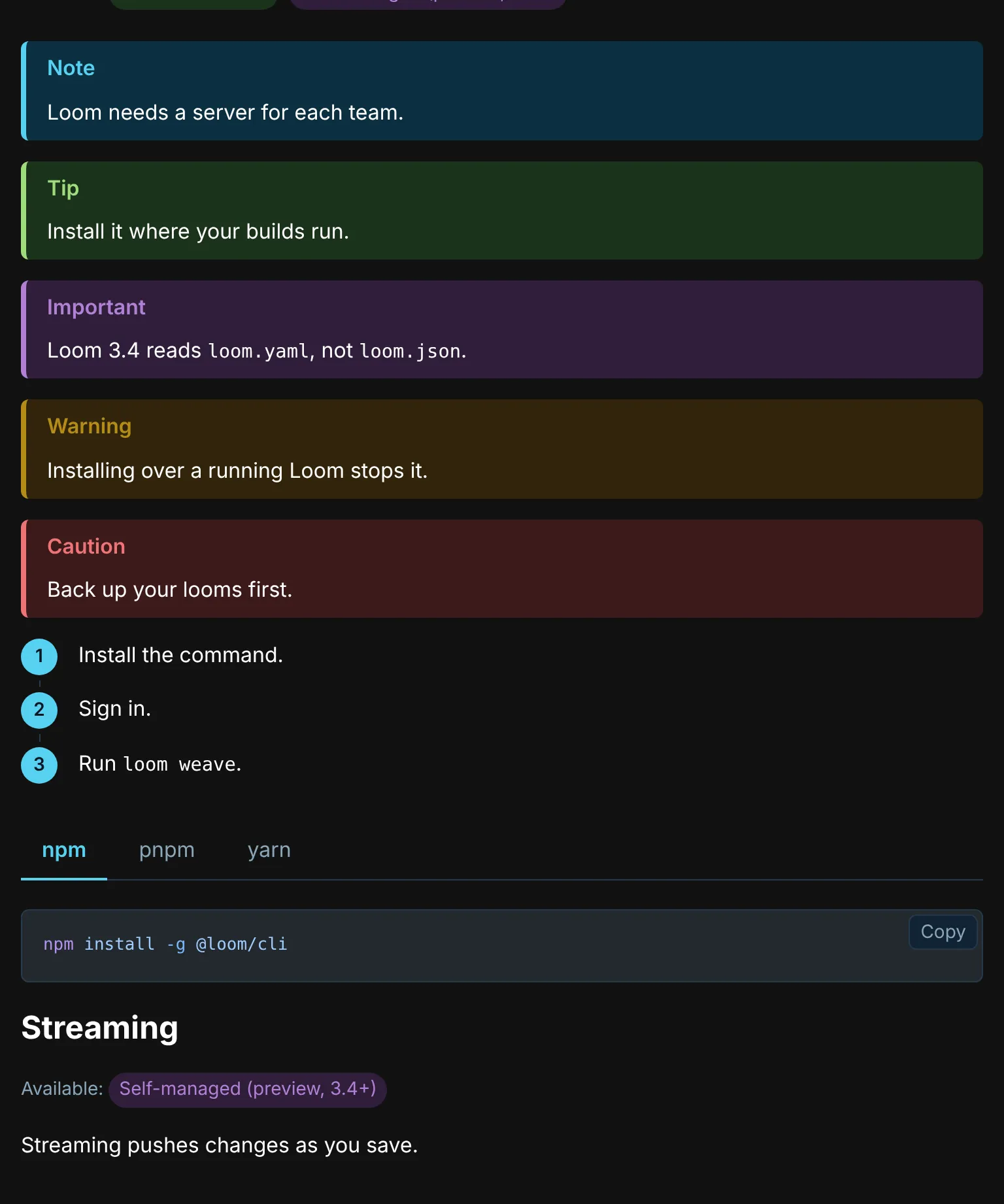
The default colors are light or dark as the page is: dark where the page’s color-scheme is dark, or light dark while the reader’s system is in dark mode, and light otherwise, including on a page that declares no color-scheme. So a site with a dark mode gets dark elements by declaring it:
:root {
  color-scheme: light dark;
}
A page whose colors don’t follow its color-scheme sets data-ascribe-scheme="light" or "dark" on its root element. The defaults use CSS light-dark(), and a browser without it shows the light colors.
A property a site sets replaces both colors, so set both when you set one:
:root {
  --ascribe-note-color: light-dark(#0550ae, #79c0ff);
}
A project’s own note types and lifecycle states
A note carries its type, and an availability target its states, as attributes, so a project styles its own by selecting on them. A note or a badge takes its colors from --_color and --_background:
ascribe-note[type="security"] {
  --_color: #b62324;
  --_background: #fff0f0;
}

ascribe-availability-target[states="sunset"],
ascribe-availability-target[states$=" sunset"] {
  --_color: #6e7781;
  --_background: #eaeef2;
}
states lists a target’s states in order, and the last one styles the badge, so match it as a whole word, as above: [states="x"], [states$=" x"]. A bare [states$="x"] would also match a state named pre-x. A type or a state the library doesn’t style gets the default: the note type’s colors, or the neutral badge’s, --ascribe-state-color and --ascribe-state-background.
The colors can come from the library’s own properties, so a project’s state looks like one of Ascribe’s in both schemes: this site gives a planned version, [planned], the colors of preview, with --_color: var(--ascribe-state-preview-color) and --_background: var(--ascribe-state-preview-background).
Generated text
A note’s heading line comes from the element’s attributes through CSS generated content. So does the lead-in of a line of availability badges, ascribe-availability::before, which is Available: ; the lead-in of a tested code block’s caption, .ascribe-code-tested::before, which is Tested with (§9); and the line after a link to another line of a versioned build, a[data-ascribe-release-line]::after, such as (3.5) (§10). A site can restyle or translate each:
ascribe-availability::before {
  content: "Disponible : ";
}
A table row’s badges have no lead-in in sight. Their (Available: and ) are in the HTML, in spans with the class ascribe-availability-lead-in, which the stylesheet hides from sight and not from a screen reader, so the row reads as the page’s Markdown writes it.
A tab’s label isn’t generated: it’s text, the tab’s first paragraph, <p class="ascribe-tab-label">, so a reader of the HTML that runs neither script nor stylesheet, such as a tool that converts the page to text for an AI agent, finds each label before its tab’s content. Without the script it introduces the tab; with it, the tab’s button shows the label, and the paragraph is out of sight and hidden from screen readers, which hear the label once, from the button (§3).
Copy buttons
The script adds a button to each code block, a <pre> holding a <code>, that copies the code: one with a title or a tested line, and one in a tab, too. It copies the code alone, without its caption or the newline that ends it, and says “Copied” in a live region, so a screen reader hears it. The button is <button class="ascribe-copy">, put after the <pre>, not inside it, so the code’s text never holds it, and it sits in the block’s top corner. With scripts off there’s no button, and on a page that isn’t a secure context, which has no clipboard, the script adds none either (§12).
To leave it out, everywhere or around some blocks, set --ascribe-copy-display to none:
:root {
  --ascribe-copy-display: none;
}
Restyle it with --ascribe-copy-color, --ascribe-copy-background, --ascribe-copy-hover-background, and --ascribe-copy-focus-color, or by selecting .ascribe-copy. Its words are the stylesheet’s generated content, like the lead-ins below, and its name and what the live region says are read from them, so translating them translates all three:
.ascribe-copy::before {
  content: "Copier";
}

.ascribe-copy[data-ascribe-copy="copied"]::before {
  content: "Copié";
}

.ascribe-copy[data-ascribe-copy="failed"]::before {
  content: "Échec de la copie";
}
Choosing a tab from a script
choose(dimension, value) makes a reader’s choice for a dimension, as selecting a tab does: it selects the value in every group on the page that syncs on the dimension, and remembers it, so the next page’s groups start on it.
import { choose } from "@ascribed/elements";
// Remembered across pages, and selected in this page's `pm` groups.
choose("pm", "pnpm");
A permalink’s page uses it to carry a choice in its address; see permalinks.