Publish a site for each version
Build the docs of every version a reader can be on from one source, a site for each release line, and move them on when a line ships.
For AI agents: the documentation index is at llms.txt, and this page is available as Markdown.
A reader on 3.4 should read the docs for 3.4, and find the same page for 3.5. This page builds an output for each version a reader can be on, from one source and the @available marks the pages already have, and moves them on when a version ships. Release lines says what a line is and what its output holds, and Export and retire a line is for a line that leaves.
Before you start
- Mark the content that’s in some versions and not others with
@available, naming a targetascribe.tomldeclares, such asself-managed 3.5. - To publish with Astro, set the site up with
@ascribed/astrofirst.
Steps
1. List the live lines
Under [releases], list the lines of the target a reader can be on:
[releases.self-managed]
live = ["3.4", "3.5"]
A line holds every version that starts with it: 3.4 holds 3.4.0 and 3.4.2. Write lines as finely as you release, ["3.4", "3.5"] for minor releases or ["0.2.0", "0.3.0"] for patch releases. The newest is the current line.
The target is the table’s name. When a dimension already has it, as deployment has self-managed, it’s that dimension’s value. A product with no dimension of its own needs none: [releases.quill] declares quill as a value of the implicit dimension release, and label gives the name a reader sees:
[releases.quill]
label = "Quill"
live = ["3.4", "3.5"]
2. Say what’s planned, ending, and gone
Add what a reader can’t be on yet, and what they can’t be on any more, if you have them:
[releases.self-managed]
live = ["3.4", "3.5"]
planned = ["3.6"]

[releases.self-managed.ends]
"3.4" = 2027-01-31

[releases.self-managed.archived]
"3.2" = { url = "https://docs.example.com/3.2/", ended = 2026-03-31 }
"3.3" = {}
Content marked for a planned version reads “planned” until its line ships, and a line whose ends has passed is reported until you archive it. The [releases] reference has each key and what the checks find in the marks once the list is there.
3. Version a build
Name the target on the build that makes your site:
[builds.site]
availability = "badge"
versions = "self-managed"
The build now writes an output for each live line. The current line keeps the build’s name and addresses, so turning versions on moves no address; each other line is <build>@<line>, under its number after the base path:
| Line | Output | A page at install.md |
|---|---|---|
| 3.5, current | .ascribe/build/site/ |
/docs/install/ |
| 3.4 | .ascribe/build/site@3.4/ |
/docs/3.4/install/ |
4. Check and build each line
ascribe check
ascribe build
ascribe check checks every line as a build, and reports a problem that’s in more than one line once, saying which. ascribe build writes every line; --build site@3.4 builds one. ascribe versions list shows each line, its output, and how many pages it publishes, as in examples/quill:
self-managed, versioning `site`
  3.5  current   site at /, 6 pages
  3.4  live      site@3.4 at /3.4/, 5 pages
5. Publish with Astro
@ascribed/astro serves every line from one site, with no change to astro.config.mjs or src/content.config.ts. Run npx @ascribed/astro init to write the layout, or add these to your own:
---
import Versions from "@ascribed/astro/Versions.astro";
import VersionBanner from "@ascribed/astro/VersionBanner.astro";
---
<VersionBanner entry={entry} />
<Versions entry={entry} />
On an older line’s page, in the starter’s layout:
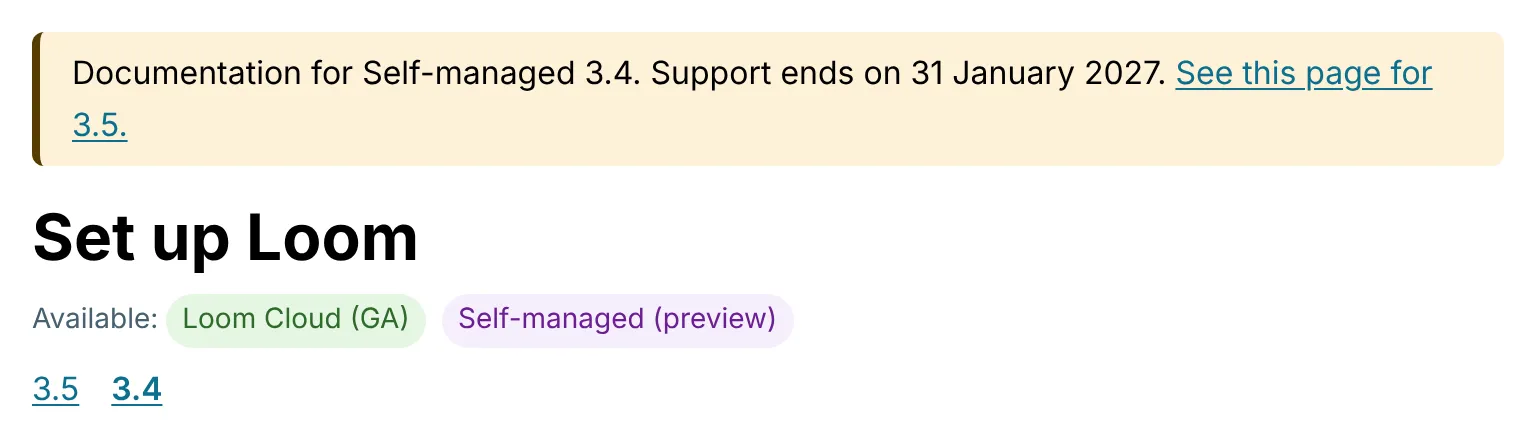
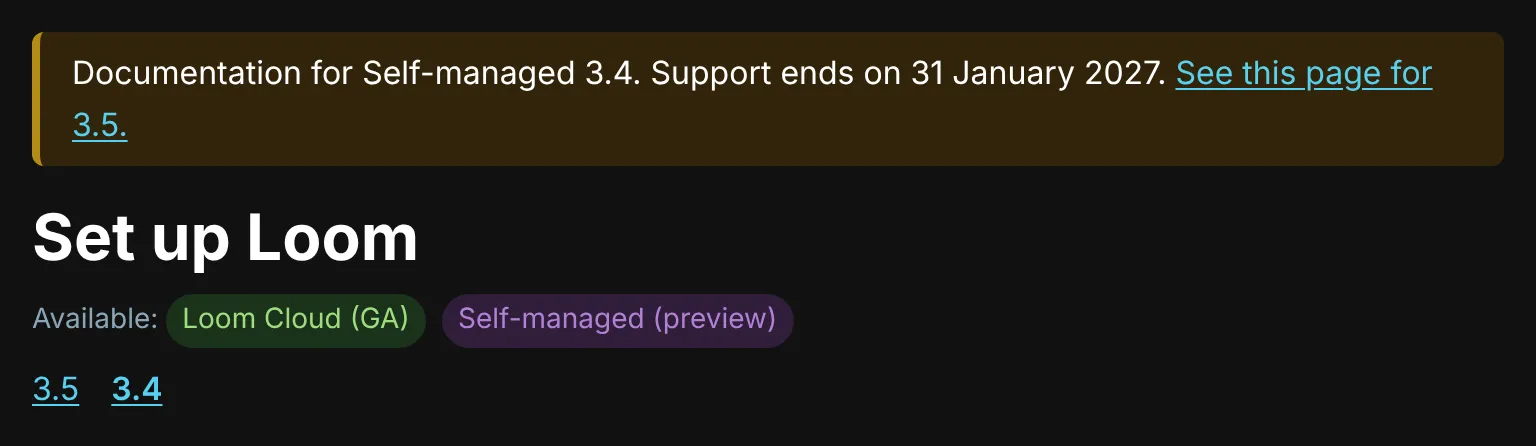
Pass the entry to the sidebar too, sidebar(entries, { entry }), so it lists the pages of the page’s own line. The Astro components has what each shows and the words it takes.
A site not built with Astro reads the same from versions.json and the page records: What the lines know about each other says where each part is.
When a line ships
Before a line ships, mark what’s written for it with planned where its version goes: @available: self-managed planned, or self-managed preview planned, means the target’s planned line, so the pages don’t write its number until it’s released. On the day, one command moves the docs:
ascribe versions release "self-managed 3.6"It rewrites each planned for self-managed to 3.6, as self-managed planned becomes self-managed 3.6, adds the line after it to planned when --next names one, and moves 3.6 from planned to live. Where no build is versioned by the target, it also moves the old current line to archived, with its ends date, if it has one, as ended, since such a project publishes one line, and removes or rewrites the marks that named a version in it, which every line left has; a project that builds a site for each line keeps the old line live until you retire it. Commit the change it writes: it’s one commit, and git checkout undoes it. Run it with --dry-run first to see what it would do; the command’s reference has when it refuses and why.
Then start the release notes from what the new line has that the one before didn’t:
ascribe versions changes "self-managed 3.5" 3.6 --format markdownSee also
- Release lines: what each line’s output holds, how links between lines go, and what an older line says about itself.
- Export and retire a line: export a copy of a line, then take it out of the source.
ascribe versions: the commands’ options and output.